Product photo in.Scroll-stopping video ad out.
Chain the AI models you already pay for into a finished 9:16 ad, on your own computer. No credits, no markup: you pay each provider directly, at their prices.
Trial in the app, no card needed · then $49 once
Drop a product photoGet three shotsJoin them into one ad
One photo. Three shots.One ad.
Each box below is a node on the RikuFlow canvas. You pick the model inside each one, from the providers you connected.
- Drop your product photoWire it into three Image nodes, each with its own prompt: a clean studio shot, a lifestyle scene, a close-up detail. Use ChatGPT through Codex, Gemini, Runware or any image model you connected.
- Animate each shotEvery image becomes the start frame of a Video node, in 9:16 for Reels, Shorts and TikTok. Pick any video model you can reach: RunningHub workflows, Veo, Kling, Seedance and more.
- Join them into one adA Join node puts the three shots one after another, with the ffmpeg on your computer. No upload, no extra charge.
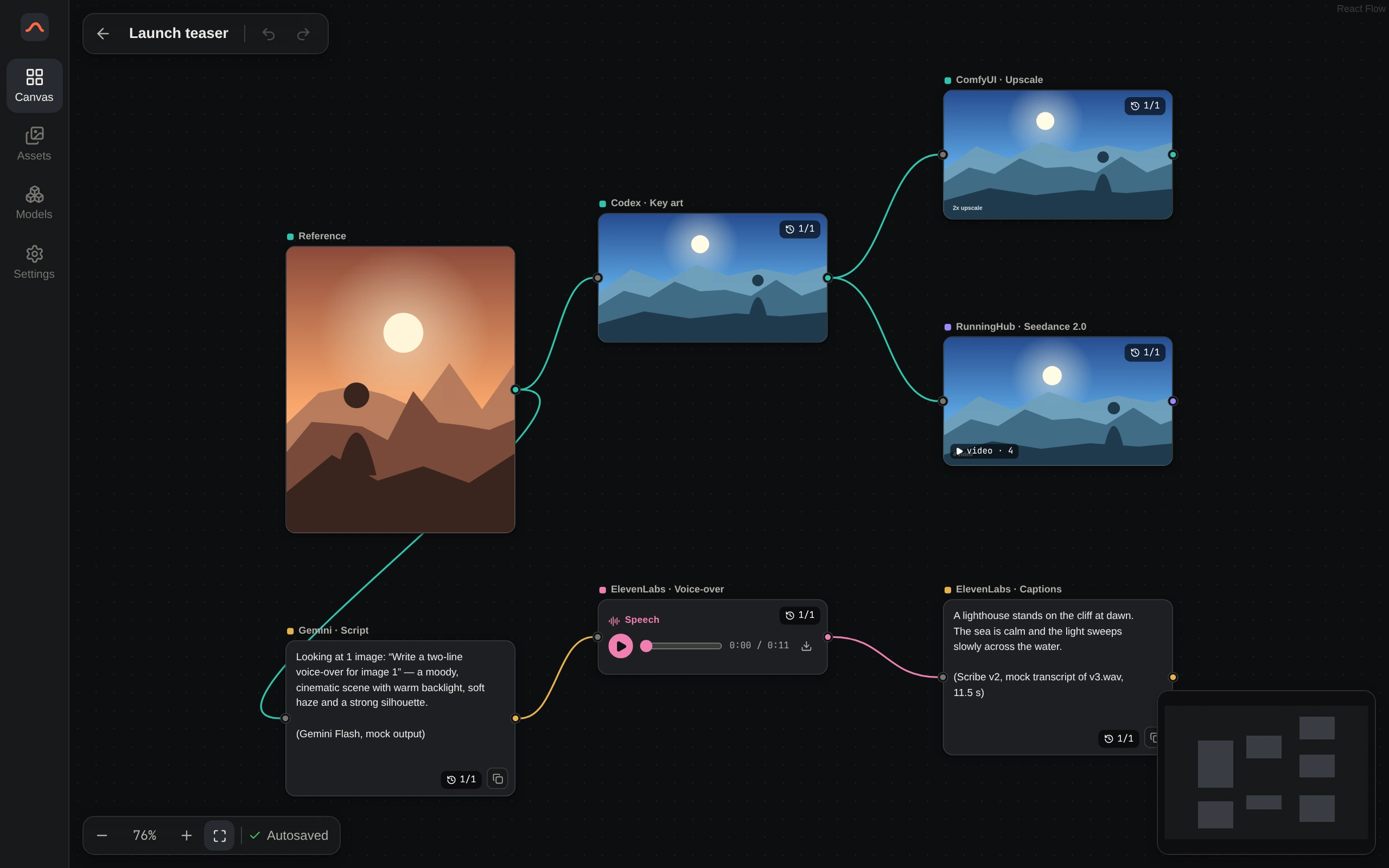
A real canvas from the app (a launch teaser, not the product-ad template): nodes wired left to right, each with its own model.
You pay providers directly.At their prices.
RikuFlow is the workspace. The AI runs on your own accounts, and RikuFlow adds nothing on top.
- $49 once for the appWith 12 months of updates. No monthly fee, no credits to top up.
- Each Run is billed by the provider you pickedOn your account, at their published price. The node shows a cost estimate before you run, where the provider publishes rates.
- Subscriptions count tooImage and text through Codex use your ChatGPT plan; text through the Claude CLI uses your Claude plan. Their plan limits apply.
- Edits are freeJoin, Trim, Split and Frame at run on your own ffmpeg. No account, no cost.
Why not a cloud canvas?Because you already pay for AI.
Many cloud canvases sell their own credits and keep your files on their servers. RikuFlow works the other way round.
- Your keys
Your accounts, your limits
Connect your own API keys. They stay on your computer, and generations go straight to the provider.
- Your files
Every ad in a folder you control
Projects, references and every result live on your machine. Back up or move everything with one file.
- No markup
Provider prices, not resold credits
You see what each provider charges. RikuFlow never adds a margin to a generation.
- Your subscriptions
Use the plans you already have
Your ChatGPT plan through the Codex CLI, your Claude plan through the Claude CLI, signed in on your computer.
- Your workflows
Bring ComfyUI and RunningHub
Run your local ComfyUI graphs and your RunningHub workflows or AI apps as nodes, next to the cloud models.
Make the tenth adas fast as the second.
- Continue
Shots that flow into each other
On a finished video, Continue takes its last frame and starts the next shot from it, so each clip picks up where the last one ended.
- Run stale
New product, same ad, one click
Replace the source photo and everything that depends on it is marked stale. Run stale re-runs exactly those nodes, in order.
- Pin result
Keep the take you love
Every run is kept. Pin the best one and everything downstream uses it, even when you re-run. Go back to any earlier version.
- Tools
Trim, split and join on the canvas
Cut the slow second, split a clip, grab a frame, join the shots. All with your own ffmpeg, free.
- Phone
Check renders from your phone
Set a password, open RikuFlow on your local network, and follow progress from any phone or tablet at home.
- Templates
Load, drop a photo, Run
Ready-made workflows like the one above, so the first ad takes minutes instead of an evening.
Who it’s for.And who it isn’t.
RikuFlow is for you if
- You sell products online and need fresh video ads every week
- You make product content for clients and want to reuse one workflow
- You already pay for ChatGPT, Claude, RunningHub or an API, and want them working together
- You use ComfyUI and want finished steps instead of samplers and latents
Look elsewhere if
- You want one subscription that includes all AI usage. RikuFlow needs your own provider accounts.
- You want a single “make my ad” button. Templates get you close, but you still pick the models and press Run.
- You need a shared cloud workspace for a team. RikuFlow runs on your computer, one user per setup.
Pay once.Make every ad after that.
- $49 once for RikuFlowThe whole workspace, yours to keep, with 12 months of updates. Renewal is optional.
- Free for 14 days firstEvery feature, started in the app with your email. No card.
- AI at your provider’s priceBilled by them, on your account, with no RikuFlow markup.
$49 USD
12 months of updates included.
- All built-in integrations, local ComfyUI and custom workflows
- Up to 3 of your devices · Windows, macOS, Linux
Do I need API keys?
You need at least one way to reach the AI: an API key from a provider (such as Google Gemini, OpenAI, Runware, AtlasCloud, OpenRouter, RunningHub or ElevenLabs), a supported subscription signed in on your computer (ChatGPT through the Codex CLI, Claude through the Claude CLI), or your own ComfyUI. For video ads you need at least one provider with video models. Keys stay on your computer.
What does it cost to run?
RikuFlow itself is $49 once. Each generation is billed by the provider you picked, on your account, at their price; subscriptions use your plan’s allowance. RikuFlow adds no markup and shows cost estimates where the provider publishes rates. Join, Trim, Split and Frame at use your own ffmpeg and cost nothing.
Does it work offline?
Once activated, you can open and organise your projects offline. Cloud generation needs the internet. Your work stays on your machine; a workflow stays fully on your machine or local network only when all its models run there, like a local ComfyUI.
Windows, Mac or Linux?
All three: macOS (Apple Silicon (arm64), Intel (x64); macOS 13.5 or later); Windows (x64; Windows 10 or 11); Linux (x64, arm64; glibc 2.28 or later). One license covers up to 3 of your devices. The first releases are not code-signed; the install guide shows what to click.
Do I need ffmpeg?
For the video tools (Join, Trim, Split, Frame at), yes: RikuFlow uses the ffmpeg on your computer and never installs it for you. The ffmpeg guide covers every system. Generating images and videos does not need it.
Is there a ready-made product-ad template?
Yes. RikuFlow ships with three: Product photo → video ad, 3-shot product ad and Seamless long shot. Each node uses the first of your models that fits; save your own workflows as templates too.
How does the trial work?
Download RikuFlow, open it and enter your email: we email you a 6-digit code, and the trial starts on that computer. The 14 days run from that first activation, on one device. After it ends, your projects, exports and backups stay available. More about the trial